

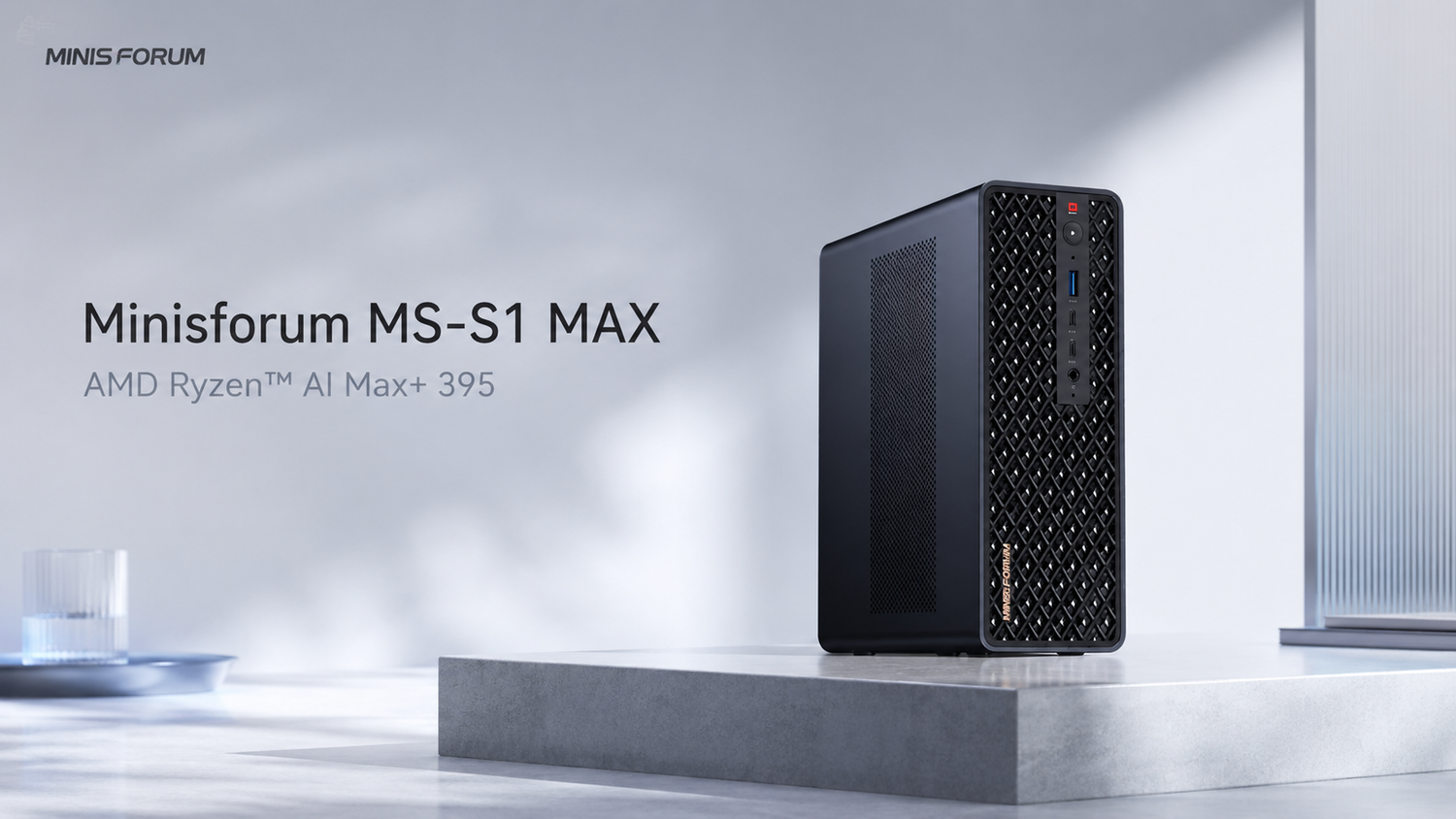
For users working with local AI, video creation and demanding multitasking, the MINISFORUM MS-S1 MAX with Ryzen AI Max+ 395 offers a more complete all-in-one solution than a typical high-performance Intel mini PC. It delivers strong processing power, 64GB of memory, local AI capability, dual 10GbE networking and extensive expansion options without requiring an additional dedicated graphics card.
High-performance Intel mini PCs based on processors such as the Core Ultra 9 285HX are more focused on traditional CPU-heavy workloads. They suit large software builds, virtual machines and users who want replaceable memory. The advantage of the MS-S1 MAX is that it can handle AI, creative work, development and everyday tasks with fewer separate components.
Who Should Choose Ryzen AI Max+ 395 or a High-Performance Intel Mini PC?
Users who want to run AI models locally, create content or reduce their reliance on a dedicated graphics card are better served by the Ryzen AI Max+ 395. Users focused mainly on CPU computing and conventional hardware upgrades may prefer the Intel Core Ultra 9 285HX.
The biggest difference between these two product types is how much additional hardware you may need after purchase.
The Intel Core Ultra 9 285HX has more CPU cores. Its integrated graphics are mainly intended for everyday display output and basic graphics tasks. Users who also need stronger AI, 3D or gaming performance will usually need a system with a dedicated graphics card.
The Ryzen AI Max+ 395 combines a high-performance CPU, Radeon 8060S graphics and AI acceleration on one platform. Users can test local models, edit video, process images and play games at 1080p without buying an additional dedicated graphics card.
- Mainly running local AI: Consider the MS-S1 MAX first.
- Combining AI, development and video creation: The MS-S1 MAX offers a more complete configuration.
- Mainly running virtual machines and CPU workloads: The Intel Core Ultra 9 285HX is more attractive.
- NVIDIA CUDA is essential: Choose a workstation with a dedicated NVIDIA graphics card.
What Is the Difference Between the AI Max+ 395 and Intel Core Ultra 9 285HX?
The AI Max+ 395 places more emphasis on local AI, graphics performance and shared access to a large memory pool, while the Core Ultra 9 285HX focuses more on pure CPU performance and conventional memory upgrades.
| Category | Ryzen AI Max+ 395 | Core Ultra 9 285HX | Practical Value |
|---|---|---|---|
| CPU | 16 cores, 32 threads | 24 cores, 24 threads | Both can handle demanding multitasking, while Intel is more focused on pure CPU workloads |
| Graphics | High-performance Radeon 8060S integrated graphics | Basic integrated graphics | The AMD platform can reduce the need for a dedicated graphics card |
| AI Performance | Up to 126 TOPS across the platform | Up to 36 TOPS across the platform | AMD is better suited to local AI applications and mixed AI workloads |
| Memory Design | 64GB of high-speed unified memory | Supports up to 256GB DDR5 | AMD gives the GPU access to a larger shared memory pool, while Intel is better suited to conventional capacity upgrades |
| Dedicated GPU Required? | Not required for most everyday AI and creative tasks | Usually required for demanding AI and graphics workloads | AMD can reduce graphics card, power supply and cooling costs |
| Best Use Cases | Local AI, creative work, development and compact workstations | Large software builds, virtual machines and traditional workstations | Choose based on your main workload rather than core count alone |

How Good Is the AI Max+ 395 in Real-World Use?
The main advantage of the AI Max+ 395 is that it combines a high-performance CPU, powerful integrated graphics and local AI capability in one compact computer.
Its 16 cores and 32 threads can run a code editor, multiple browser windows, Docker, databases and local AI services at the same time. For software development, data processing and content creation, this provides the multitasking performance expected from a high-end desktop.
The Intel Core Ultra 9 285HX has 24 cores and is stronger for large code builds, CPU rendering and workloads involving several virtual machines. Users who also want strong AI and graphics performance will usually need to add a dedicated graphics card.
The MS-S1 MAX takes a different approach. A single processor handles computing, graphics and AI workloads, reducing the additional complexity of a dedicated graphics card, a larger power supply and a bigger case.
Can the MS-S1 MAX Run Local AI Models?
The 64GB version of the MS-S1 MAX can run local large language models, RAG knowledge bases, coding assistants and a range of AI prototypes, making local AI one of its most important advantages.
The 16GB or 32GB memory commonly found in standard mini PCs is mainly suitable for smaller models and simple AI tools. The MS-S1 MAX provides 64GB of high-speed memory, allowing it to hold larger models, longer conversations, databases and development software at the same time.
MINISFORUM positions the 64GB version as an AI development system capable of running models above 35B locally. It is suitable for the following tasks:
- Building internal document search and knowledge-base question-and-answer systems.
- Running local AI assistants without uploading data to the cloud.
- Testing code generation, document summarisation and automation tools.
- Delivering on-site AI demonstrations and validating projects with customers.
- Running models, databases, API services and front-end pages at the same time.
Can the Radeon 8060S Replace a Dedicated Graphics Card?
The Radeon 8060S can replace some mid-range dedicated graphics cards for local AI, video editing, image processing and 1080p gaming, but it cannot replace the NVIDIA CUDA software ecosystem.
Although standard high-performance Intel processors offer strong CPU performance, their integrated graphics are usually best suited to office work, multi-monitor setups and light graphics tasks. Heavier video processing, 3D work or GPU acceleration often requires an additional dedicated graphics card.
The Radeon 8060S sits in a much higher performance class. In TechRadar's test of the MS-S1 MAX, it achieved a 3DMark Time Spy Graphics score of 11,056, far above typical office-focused integrated graphics.
Even without a dedicated graphics card, it can handle everyday video editing, AI image workflows, hardware acceleration and most 1080p games smoothly.
Some professional AI software supports NVIDIA CUDA only, so users of those applications will still need an NVIDIA graphics card. For LM Studio, llama.cpp and local AI tools that support AMD platforms, the Radeon 8060S offers a simpler all-in-one solution.
What Are the Practical Benefits of 64GB Memory, Dual 10GbE and USB4 V2?
These features make the MS-S1 MAX more than a fast mini PC. They allow it to fit into real local AI, NAS, large-file and team development workflows.
64GB of Memory Supports Larger Models
The most common limitation in local AI is often not processor speed, but insufficient memory to load the model. With 64GB of memory, users can run larger quantised models while keeping enough capacity available for the operating system, databases and other development software.
Dual 10GbE Provides Faster NAS Connections
AI models, video files and project data can easily reach tens of gigabytes or more. Dual 10GbE networking speeds up file transfers between the computer, a NAS, a server or another compute device.
The two network ports can also connect separately to internal storage and the office network, making them useful for studios, laboratories and small teams.
USB4 V2 Connects High-Speed External Devices
The MS-S1 MAX provides two USB4 V2 ports with speeds of up to 80Gbps. They can connect high-speed external drives, docking stations, displays and other professional devices.
For users who regularly move large models, 4K video or project files, the faster connection can significantly reduce transfer and waiting times.
The PCIe Slot Adds Extra Expansion Options
The internal PCIe expansion slot can accommodate compatible high-speed network cards, storage controllers, capture cards and other devices.
This makes the MS-S1 MAX easier to adapt to future requirements than a fully closed standard mini PC.
How Large and Noisy Is the MS-S1 MAX?
The MS-S1 MAX is larger than a standard office mini PC and its fans become noticeable under heavy load because it is essentially a compact high-performance workstation.
Its chassis measures approximately 222.1 × 206.3 × 77.1mm and weighs around 2.8kg. It is not a pocket-sized computer, but it remains much smaller than a traditional tower workstation.
The built-in 320W power supply is another practical design choice. There is no large external power adapter taking up space on the desk, making installation and relocation tidier.
The MS-S1 MAX offers Quiet, Balanced, Performance and Rack operating modes. Balanced mode works well for everyday development and office work, while Performance mode can be used for larger models, video exports and other demanding workloads.
ServeTheHome found that fan noise becomes noticeable in Performance mode. For users keeping the system next to their desk for long periods, Balanced mode should provide a more comfortable experience.
Why Consider the MS-S1 MAX Over a Standard AI Max+ 395 Mini PC?
The advantages of the MS-S1 MAX come not only from the AI Max+ 395, but also from the complete combination of cooling, networking, ports, storage and expansion.
Computers using the same AI Max+ 395 can still deliver different real-world experiences. Limited cooling can reduce sustained performance, insufficient ports can require extra docks and adapters, and slower networking can restrict large-file and NAS workflows.
The MS-S1 MAX uses two fans and six heat pipes to support sustained model workloads, video exports and multitasking. It also provides dual 10GbE, USB4 V2, two M.2 storage slots and PCIe expansion.
These features allow it to operate as a personal desktop workstation or to be installed in a 2U rack for small teams, laboratories or multi-device deployments.
Who Should Buy the MS-S1 MAX?
The MS-S1 MAX is best suited to users who need local AI, a large memory capacity and high-performance multitasking, but do not want to build a large workstation around a dedicated graphics card.
- AI developers: Test local models, RAG systems, coding assistants and AI applications.
- Independent developers: Run models, databases, containers and front-end projects at the same time.
- AI consultants and solution teams: Deliver customer demonstrations, on-site testing and project validation.
- Content creators: Work with video, images, AI generation and demanding multitasking.
- Small studios: Connect to NAS storage, share project data and run internal AI tools.
- Universities and laboratories: Build space-efficient local AI teaching and research environments.
Users who only browse the web, edit documents and handle basic office work do not need this level of performance. Those mainly interested in demanding games may also be better served by a conventional gaming PC.
The MS-S1 MAX is designed for a different need: users who want local AI, strong multitasking, large memory, fast networking and extensive expansion in one relatively compact computer.
Is the MINISFORUM MS-S1 MAX Worth Buying?
For local AI development, content creation and demanding multitasking, the MINISFORUM MS-S1 MAX is a more complete all-in-one choice than a typical high-performance Intel mini PC.
The Intel Core Ultra 9 285HX offers more CPU cores and supports larger replaceable memory configurations, making it well suited to pure CPU workloads, virtual machines and traditional workstation requirements.
The advantage of the AI Max+ 395 is that it combines a strong CPU, powerful integrated graphics and AI acceleration. Users can work with local models, video editing, image generation and everyday development without adding a separate graphics card.
The MS-S1 MAX builds on this with 64GB of memory, dual 10GbE, USB4 V2, PCIe expansion and 2U rack support. This reduces the number of compromises involving graphics cards, external network adapters, docking stations and large cases.
For users who want a compact, complete local AI workstation designed for long-term use, the MS-S1 MAX deserves serious consideration.

Frequently Asked Questions About the AI Max+ 395 and MS-S1 MAX
The following questions cover AI Max+ 395 performance, local models, gaming, memory upgrades and purchase decisions.
What Is the Ryzen AI Max+ 395?
The Ryzen AI Max+ 395 combines a high-performance CPU, Radeon 8060S graphics and AI acceleration in one processor. It is mainly designed for high-performance mini PCs, AI workstations and creative computers.
Which Is Better: AI Max+ 395 or Intel Core Ultra 9 285HX?
Choose the AI Max+ 395 for local AI, graphics processing and all-in-one use. Choose the Intel Core Ultra 9 285HX for pure CPU workloads, virtual machines and conventional memory upgrades.
What Size Local Models Can the 64GB MS-S1 MAX Run?
The 64GB MS-S1 MAX is mainly designed for quantised models above 35B and is also suitable for RAG systems, coding assistants, document summarisation and multimodal AI prototypes.
Does the MS-S1 MAX Need a Dedicated Graphics Card?
Most local AI, video editing, image processing and 1080p gaming tasks do not require an additional dedicated graphics card because the Radeon 8060S is significantly more powerful than standard integrated graphics.
Is the MS-S1 MAX Suitable for Video Editing?
The MS-S1 MAX is suitable for 4K video editing, image processing and AI content creation. Its large memory capacity and powerful integrated graphics improve the experience with large files and complex multitasking timelines.
Can the MS-S1 MAX Run Games?
The MS-S1 MAX can run most games at 1080p. Gaming is best viewed as an additional capability of an AI and creative workstation rather than a direct replacement for a high-end gaming PC.
Can the Memory in the MS-S1 MAX Be Upgraded?
The memory in the 64GB version is fixed to the motherboard and cannot be upgraded to 128GB after purchase, so users should decide what model sizes they expect to run before choosing a configuration.
Can the MS-S1 MAX Replace an NVIDIA AI Workstation?
The MS-S1 MAX can handle many local inference and AI development tasks, but it cannot replace the CUDA software ecosystem. Projects that specifically depend on CUDA or particular NVIDIA tools still require an NVIDIA graphics card.
Is the MS-S1 MAX Worth Buying for AI Developers?
AI developers who need local models, 64GB of memory, fast networking and compact deployment should consider it. The system reduces the complexity of using a separate graphics card, a large case and multiple external devices.
Sources and Test Data
The product specifications and performance information in this article come from official MINISFORUM, AMD and Intel materials, as well as public testing by ServeTheHome and TechRadar.
Note: Product specifications in this article are based on official information from the brand and chip manufacturers. Some performance data comes from manufacturer testing or publicly available reviews. Actual results may vary depending on the test platform, system configuration, power settings, driver version and software environment. The figures are primarily intended to show the product's performance class and practical capabilities.


Leave a comment
This site is protected by hCaptcha and the hCaptcha Privacy Policy and Terms of Service apply.